Port 25 is blocked. Here is what an SMTP relay does, and why your self-hosted mail needs one
Self-hosted email that receives perfectly but lands in spam on the way out is almost always the same problem. What outbound port 25 blocking means, how an SMTP relay fixes it, and how we configure and verify it for you.
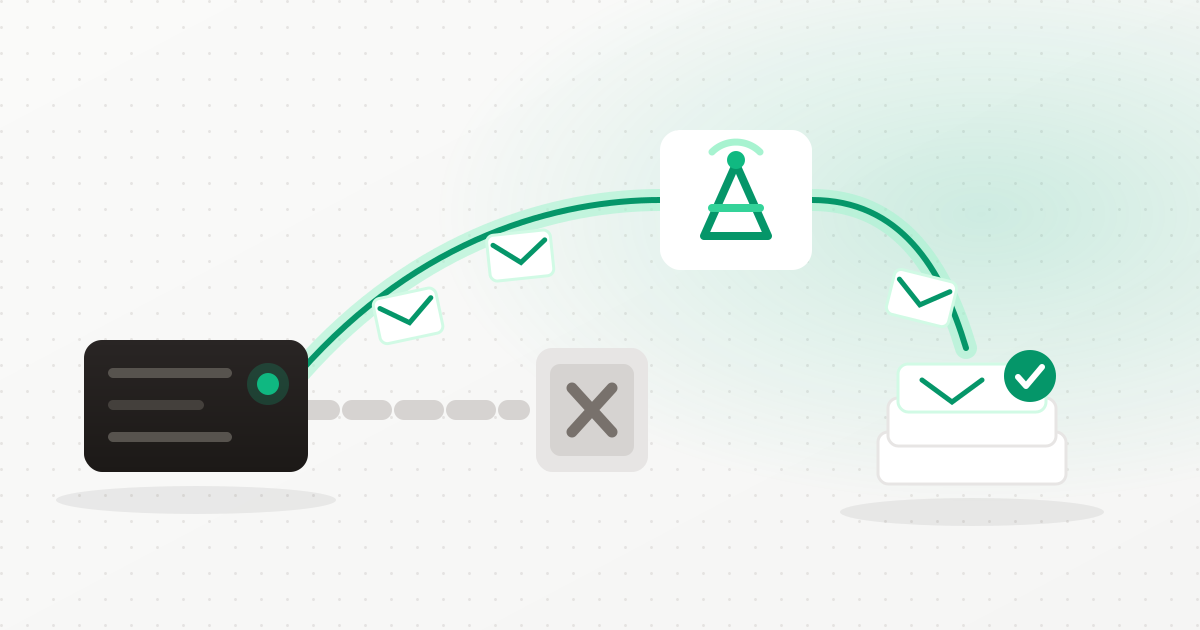
There is a failure mode in self-hosted email that catches everyone exactly once. Inbound works perfectly — mail arrives, the webmail loads, the mailbox is real. Outbound appears to work too: the message leaves, no error is shown, the sent folder fills up. And nothing you send ever arrives, or it arrives in spam, or it arrives for some recipients and not others.
The cause is almost always the same, and it is not your configuration. It is outbound port 25.
What is actually blocked, and why
Mail servers talk to each other on port 25. Almost every cloud and hosting provider blocks outbound connections to port 25 from customer machines by default — DigitalOcean, AWS, Azure, Google Cloud, Oracle, most VPS providers. Inbound port 25 is fine; that is how you receive mail. It is sending directly that is closed.
The reason is reputation, and it is genuinely not arbitrary. Deliverability is decided largely by the reputation of the IP address a message came from, and cloud IP ranges are shared, recycled and heavily abused. One compromised WordPress install on one machine can get a whole range flagged. Providers block outbound 25 because the alternative is that their address space becomes undeliverable for everybody on it.
We block it too, platform-wide, and for the same reason. Your server sits in a range shared with other customers. If one of them sends spam directly, every other sender in that range pays for it. So on this platform, outbound mail is never sent directly — it is handed to a relay.
What an SMTP relay actually is
A relay is a mail provider that accepts your outbound message on an authenticated port — 587 or 465, which are not blocked — and delivers it onward from their infrastructure. You are borrowing their IP reputation, their warm-up history, their feedback loops with the big mailbox providers, and their relationship with the blocklists.
In Postfix terms this is one setting — relayhost — plus credentials. Conceptually it
is a bigger deal than that: it is the difference between "my server asserts it is allowed to send
as this domain" and "a party the receiving world already trusts asserts it".
This is why you still host your own mail. Your mailboxes, your stored mail, your domains, your aliases all stay on your server, on your volume. The relay only handles the final hop for outbound. Nobody else stores your inbox.
The two ways to do it here
Bring your own relay — free
If you already have SendGrid, Amazon SES, Mailgun, Postmark, SMTP2GO, Bird or any other SMTP provider, plug it in. There are presets for the common ones and a custom option for anything else. We charge nothing for this, because you are already paying your provider and the reputation at risk is yours.
Relay credentials are account-scoped and you can hold several of them — a transactional relay for the application, a different one for the newsletter, another for a second brand. They are stored encrypted and survive a server rebuild or a migration, so re-provisioning a machine does not quietly break sending.
Platform relay — metered
If you do not want to hold a provider relationship, use ours. It is metered per recipient past your tier's allowance, billed from the actual Postfix logs into a daily ledger, with month-to-date volume and cost visible in the portal. No estimate, no surprise.
Choosing per mailbox, not per server
The relay choice cascades: an account default, overridden per domain, overridden per mailbox. The
mailbox list shows the effective relay for each address and which level decided it — so
when billing@ goes out through one provider and newsletter@ through
another, you can see that at a glance instead of inferring it from a config file.
The two things we do that guides cannot
The relay is applied on install
This sounds trivial and it is the single most common way self-hosted mail is broken on day one: a mail server installed with relay settings that are recorded but never written into Postfix. On this platform the relay is configured as part of the install, not only when you later run a repair.
The relay test proves egress, not just credentials
Most tools validate a relay by checking that the username and password are well-formed. We run an actual SMTP AUTH probe from your server against the relay host. That distinguishes the two failures that look identical from the outside — wrong credentials, and correct credentials that cannot reach the relay because something in the network path is closed.
DNS: the other half of deliverability
A relay gets your mail delivered. SPF, DKIM and DMARC get it trusted. The DNS checker runs against live DNS and reports the action per record — add, change, or delete — with the value it should hold, and it catches the specific mistakes that keep mail in spam:
- Duplicate SPF or DMARC records. Two SPF records is not "extra coverage"; it is a permanent error, and receivers treat it as one.
- A stale DKIM key. Reported as replace, not add — because adding a second key next to a wrong one does not fix a signature that does not verify.
- SPF that does not include the relay. If you send through a relay, your SPF record must authorise it. The required mechanism is included in what the checker asks for, so the record you are told to publish matches how your mail is actually sent.
* Set this up once and stop thinking about it
Create an account, deploy the mail platform on a server with a block volume, connect a relay (yours or ours), and run the DNS check until every row is green. Start free →What happens if you have not paid for sending
Worth stating because most platforms handle it badly. If outbound is not currently paid for, mail is held in an outbox — not bounced, not silently dropped. When the subscription starts, the held mail is released automatically. Losing somebody's message because of a billing state is not an acceptable way to fail.
Can I ask my provider to unblock port 25?
Some providers will lift it after an account review and a history of clean usage. Even then, sending directly from a cloud IP with no reputation is a poor strategy — a relay is the better answer regardless of whether the port is open.
Does using a relay mean someone else can read my email?
Your mailboxes and stored mail stay on your own server; the platform keeps no copy. The relay handles the final hop for outbound messages only, exactly as a postal service handles a letter you posted.
Which relay provider should I choose?
For low volume, any of the common ones is fine — the free tiers of SES, Mailgun, Postmark and SMTP2GO cover most small businesses. Choose on price at your volume and on whether you want a provider relationship at all; if not, use the platform relay.
Why is my mail still going to spam with a relay configured?
Almost always DNS. Run the DNS check: an SPF record that does not include the relay, a duplicate SPF or DMARC record, or a DKIM key that no longer matches the signing key are the three usual causes.
What happens to my relay settings if I rebuild the server?
They are stored encrypted at the account level and re-applied. A rebuild or a migration does not silently lose them.
The short version
Self-hosted email is two separate problems wearing one coat. Receiving is genuinely straightforward. Sending is a reputation problem that no amount of correct configuration on your own machine can solve, because the thing being judged is the address the mail came from.
A relay is how you solve it, and configuring one properly — applied on install, verified from the server, with SPF and DKIM that match how the mail actually leaves — is the difference between mail that arrives and mail that vanishes. Create an account and set it up once.
Keep reading
Ready to simplify your hosting?
Deploy your first server in 90 seconds. All features included.
Start free